In accordance with tax authorities, Elementor adds applicable taxes (such as VAT or Sales Tax) to the price of your purchase. The tax rate charged is calculated according to your location’s regulations as determined by your billing address. Please make sure your billing information is correct.
We currently collect tax for the following locations:
- European Union (VAT)
- Israel (VAT)
- United Kingdom (VAT)
- United States (Sales Tax)
Deducting VAT payments
Eligible businesses in the EU can deduct VAT payments from their purchases. To deduct VAT, fill in your VAT number when you make your purchase.
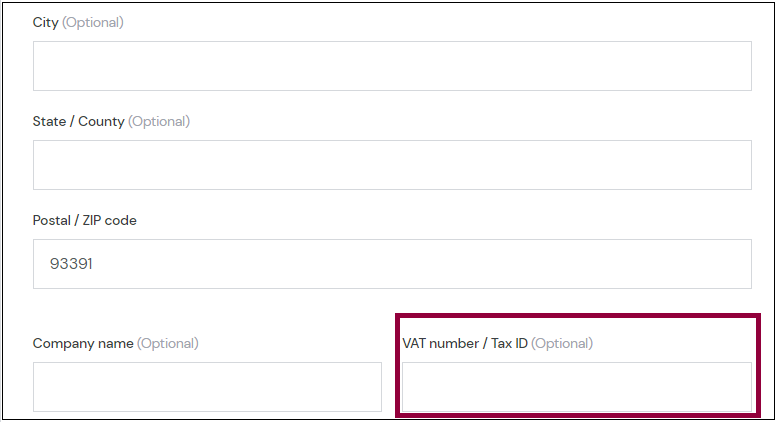
You must enter your VAT number when you make your purchase in order to deduct the VAT. For future billing of existing subscriptions (such as renewals), you can also update your VAT number at the subscription level through your My Elementor Dashboard.. If you have more than one subscription, you’ll need to add your VAT number to each subscription.
To enter your VAT number through the My Elementor Dashboard:
- Go to the Billing tab or your My Elementor Dashboard.
- Select Manage this subscription for the relevant subscription.

- Click the edit billing address icon.
- Enter your VAT number in the appropriate field.NoteVAT deductions are validated through the VIES system. If the system does not recognize the number as valid, you will receive an error message.NoteYou’ll receive notification of any VAT charges in your auto-renewal notifications.
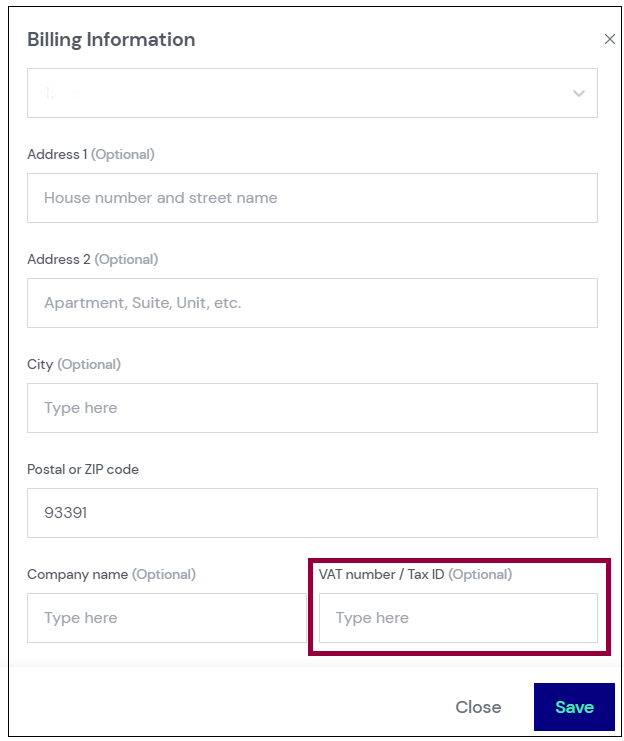

This VAT number will be used when renewing your subscription.
FAQ
Why do I have to pay VAT now when I didn’t before?
According to tax regulations (including EU VAT directives Articles 358a to 369 Directive 2006/112/EC and local US/UK tax laws), Elementor is obliged to collect applicable tax (VAT or Sales Tax) for services purchased by users. We have updated our tax compliance according to these regulations.
Am I eligible for a VAT exemption?
-
EU Businesses: You can check the EU VIES system to see if you have a valid VAT exemption status. Entering a valid EU VAT number at checkout or in your dashboard will automatically deduct VAT from your purchase.
-
UK Customers: UK users are not eligible for tax-exempt status. UK VAT is automatically applied to all purchases and renewals in accordance with local regulations.
How are taxes and VAT calculated?
Tax is calculated based on your product cost and the tax rate assigned to your billing address location:
-
VAT (EU, UK, Israel): Calculated based on your country’s national VAT rate. If an EU business provides a valid VAT number, no VAT will be added to the total.
-
US Sales Tax: Calculated based on your state and local tax regulations.
Tax is always displayed as a separate line item at checkout. For example, if a product costs $100, your total will display $100 plus the applicable tax rate for your region.
Are you going to charge me for previous years?
No! You will not be charged VAT for previous years. The VAT will be added only for purchases made after the new policy updates.