Written by Tomáš Jendek, co-founder of Webgate.
Elementor is introducing something that could significantly change how agencies build WordPress websites: an official MCP connection for tools such as Codex, Claude Code and Cursor.
Instead of generating HTML somewhere outside WordPress and then rebuilding it manually, an AI coding agent can now work directly with an Elementor website and create real, editable Elementor structures.
We have been testing the new Elementor MCP on something slightly more interesting than a demo environment: our existing production agency website.
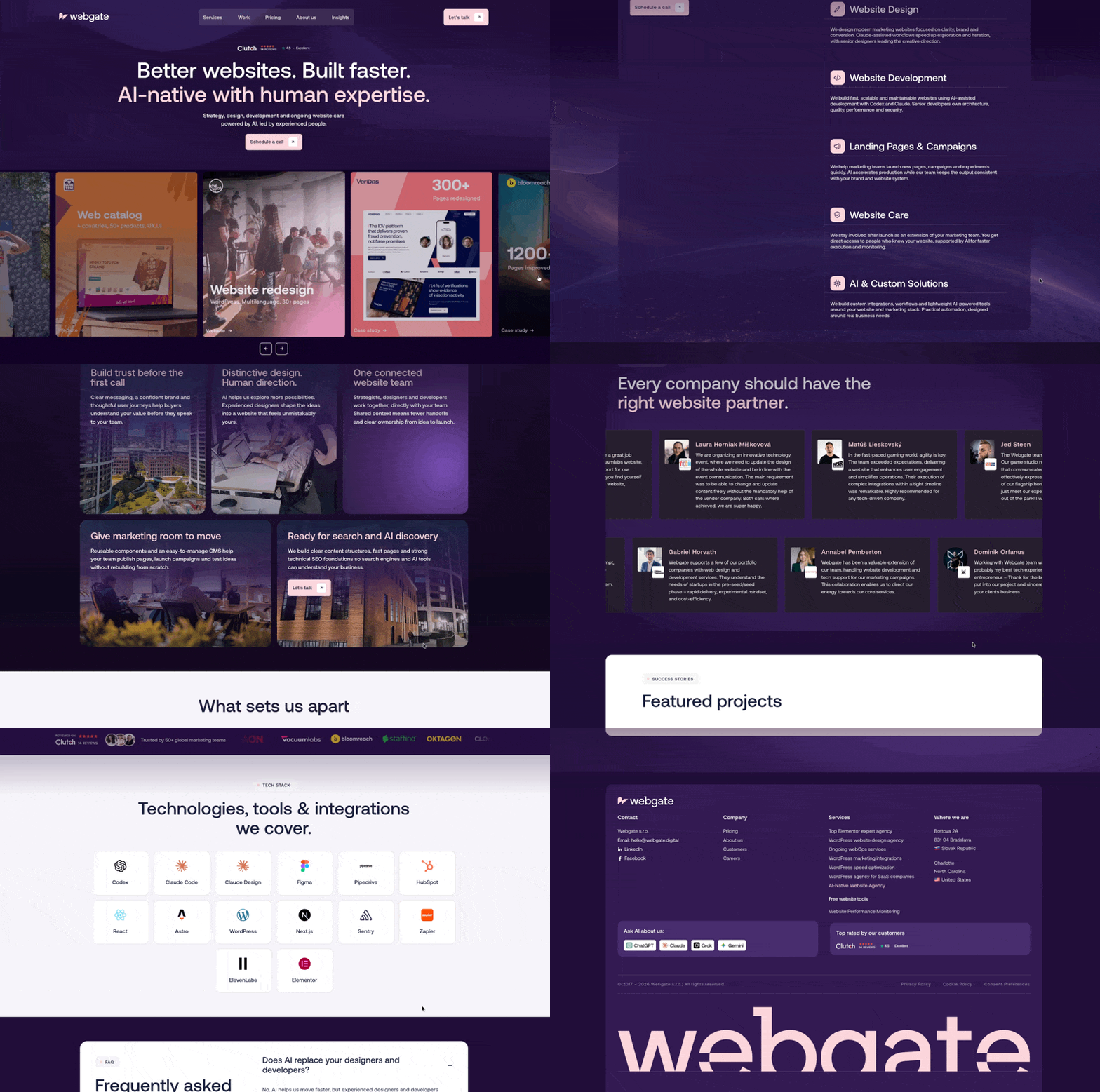
The website already contains years of existing Elementor V3 components, global styles and production content. Our question was simple: Can we introduce an AI-first Elementor development workflow without rebuilding the website or breaking the existing V3 setup?
So far, the answer looks very promising.
Our setup
Our current workflow combines:
- WordPress
- Elementor Pro
- existing Elementor V3 pages and components
- Elementor V4 / Atomic Elements
- Elementor MCP
- Codex
- Claude Code
- Figma
- screenshots and visual references
- browser-based visual QA
- the Elementor visual editor for final adjustments
The important part is that this is not a replacement project. We are not rebuilding webgate.digital in Elementor V4. Instead, we are gradually introducing Atomic Elements and MCP-based development into an existing Elementor V3 website.
That makes the test much closer to what an agency would face with a real client website.
The first production use case
The page itself is also fittingly about our AI-native approach to website development. We wanted to build it using a mix of existing Webgate design patterns and entirely new sections. Instead of starting with an empty Elementor canvas and manually assembling every container, we worked mostly through Codex and Claude Code.
The workflow looked roughly like this: Brief → existing website context → screenshots / Figma → prompts → Elementor MCP → visual QA → refinement
Some parts reuse existing Elementor V3 structures from the website. Other sections were created as new V4 Atomic structures through MCP. Both approaches live on the same production website. That was one of the things we specifically wanted to test.
V3 and V4 can coexist
One of our biggest questions before testing MCP was whether introducing Atomic Elements would force us into an all-or-nothing migration.
So far, that has not been necessary. We can keep existing V3 sections and widgets while creating new sections using V4 Atomic Elements.
This is important for agencies and complex production websites. A typical production Elementor site may contain hundreds of pages built over several years. Rebuilding everything simply to adopt a new development workflow would rarely make commercial sense.
A much more realistic migration path is:
- keep stable V3 structures where there is no reason to touch them
- build new sections and landing pages with Atomic Elements
- replace older structures gradually when they need redesigning
- eventually increase the percentage of the site running on the new system
That is essentially the approach we are taking with Webgate.
Elementor itself currently describes V4 as the Atomic Editor while maintaining V3 functionality alongside it. Elementor 4.3 also expands MCP support and Atomic capabilities rather than requiring an immediate migration of existing pages.
What Elementor MCP actually does
MCP stands for Model Context Protocol. The important part is not the acronym.
It means tools such as Codex or Claude Code can interact directly with Elementor instead of only giving you instructions or generating code that you manually copy somewhere else.
Elementor MCP exposes Elementor capabilities through the WordPress AI Abilities system.
A connected agent can currently work with things such as:
- creating pages and layouts
- editing existing layouts
- creating and applying classes and variables
- working with responsive settings
- working with components
- connecting dynamic data
- managing Theme Builder templates
- creating popups
- working with Elementor structures directly
The result is still Elementor. You can open the generated page in the Elementor editor and continue editing it normally.
Elementor also saves MCP-generated work as a draft rather than immediately publishing it. That last point matters.
For us, the value is not AI generating a website autonomously.
The value is dramatically reducing the amount of mechanical work required to translate a design decision into Elementor structure.
A simple Elementor MCP setup
Go to Elementor → Elementor MCP. From the MCP screen you can choose the client you want to connect.
Elementor currently supports setup flows for tools including:
- Claude Code
- Claude Desktop
- Codex
- Cursor
- Other MCP-compatible clients
Elementor generates a setup prompt that contains the connection information required by the AI tool.
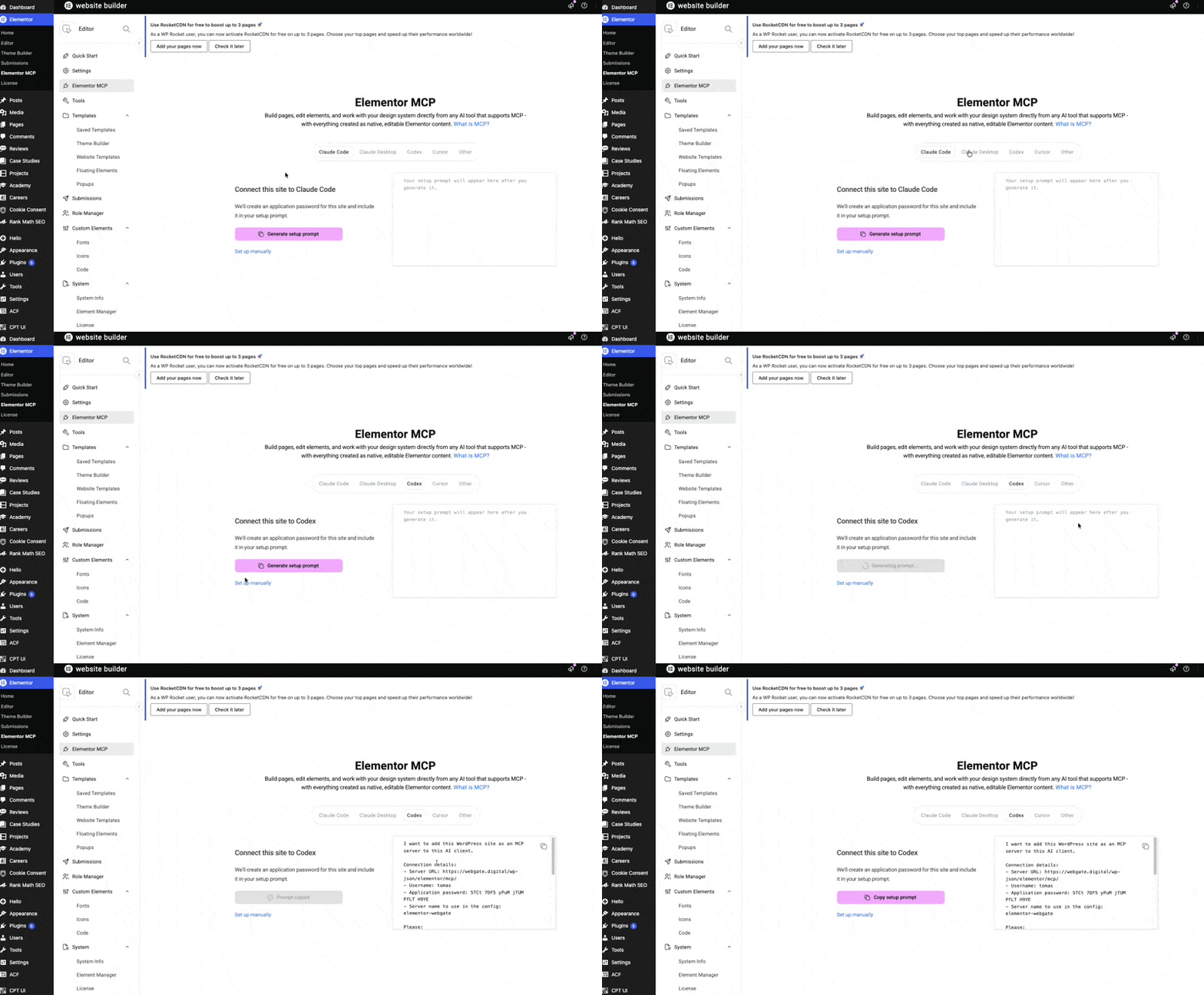
Under the hood, the connection uses a WordPress Application Password. Elementor can create this automatically during the setup flow.
Once connected, a simple first test is something like:
“Create a new draft page and add an Atomic hero section with a headline, paragraph and two CTA buttons. Use the existing website design system.”
Then open the page in Elementor and inspect what was generated.
Our most useful MCP use cases so far
The interesting part is not asking AI to “build me a website”. It is giving an agent precise development tasks. That distinction makes a huge difference.
Here is an example of the prompts used to build our landing page:
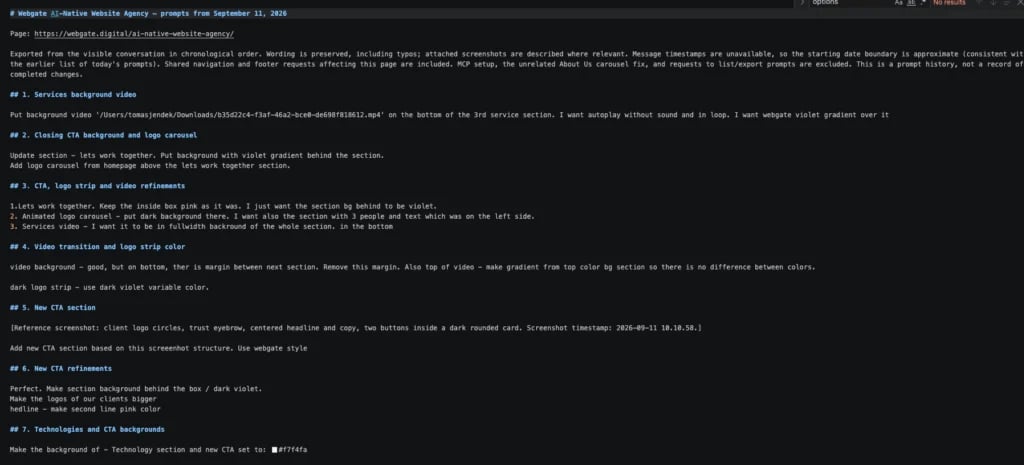
1. Building a new section from a brief

For example:
“Create a services section with six service cards. Follow the visual language of the existing site, use Atomic Elements and reuse our existing variables.”
This removes a lot of repetitive layout work. The developer can focus much more on structure and design decisions instead of clicking through dozens of controls.
2. Building from screenshots
Screenshots are surprisingly useful.
We can show the agent an existing Webgate section or another visual reference and ask it to create a structurally similar section using native Elementor elements.
The screenshot provides visual intent.
MCP handles the actual Elementor implementation.
3. Figma-to-Elementor implementation
This is probably one of the more interesting long-term workflows. The AI tool can have access to the Figma context and Elementor at the same time.
That creates a workflow closer to: Figma frame → agent interpretation → native Elementor structure
rather than: Figma → developer manually reconstructs every value inside Elementor
Elementor specifically highlights this type of workflow: an AI client can consume context from systems such as Figma, Drive or Notion and then use that context while building in Elementor.

Human review is still important, particularly around responsive behavior, spacing, typography and design-system consistency. But the amount of mechanical implementation work can be significantly reduced.
4. Reusing existing V3 structures
Not every section needs to be rebuilt with Atomic Elements. Sometimes the fastest approach is simply to reuse something that already works. On our landing page, we mixed existing V3 modules with newly generated Atomic sections. That is currently one of our favorite aspects of the workflow.
AI does not force us into a new architecture everywhere. We can choose the right implementation for each part of the page.
5. Iterating on structure
MCP becomes even more useful after the first version exists. Instead of manually restructuring containers, we can ask:
“Change this section from three equal columns to an asymmetric 40/60 layout.”
Or:
“Move the visual above the content on mobile and keep the desktop layout unchanged.”
Or:
“Replace these six individual blocks with one reusable component.”
This starts feeling much closer to working with code than working with a traditional page builder.
6. Content and copy iteration
Because Claude or Codex already has the page context, content changes can happen together with structural changes.
For example:
“Shorten all six service descriptions to a maximum of two sentences and make the section easier to scan.”
The agent can update both the content and the underlying Elementor structure during the same workflow.
7. Repetitive landing-page production
This may ultimately be the highest-value use case for marketing teams.
Once a design system and page patterns exist, producing another campaign page should require less manual assembly.
The process becomes closer to giving the agent a specification:
- use this hero pattern
- use this logo section
- add these six benefits
- use this CTA component
- apply the website’s variables
- implement the supplied copy
- create tablet and mobile versions
A developer still reviews the result. But the starting point can be dramatically further ahead.
Elementor MCP is the hands
MCP is used when the AI needs to actually work with Elementor, it gives the agent structured access to the system.
For example:
- inspect Elementor structure
- create a page
- add elements
- restructure containers
- change content
- apply classes
- use design variables
- create or modify components
The browser is the eyes
Browser access is better for understanding the rendered result.
We use it to:
- open the live page
- inspect how the design actually looks
- compare implementation against a screenshot or Figma design
- identify spacing or alignment problems
- inspect desktop and mobile behavior
- verify interactions
- run visual QA
This creates a useful loop:
MCP → render → browser inspection → new instructions → MCP
For example:
“Open the page and compare the hero against this reference. The headline is too narrow, there is too much whitespace above the CTA and the image should start approximately 80px higher. Update the Elementor section.”
The browser helps the agent understand the problem. MCP allows it to make the actual change.
We would not treat a browser extension as a replacement for Elementor MCP.
They solve different parts of the workflow.
Why we still use the Elementor visual editor
The interesting outcome of this experiment is that AI has not made Elementor’s visual editor less useful. It may actually make it more useful.
AI is very good at:
- producing the first implementation
- building structure
- repetitive configuration
- restructuring sections
- applying systematic changes
- translating clear instructions into implementation
Humans are still faster at many micro-decisions.
Moving something by a few pixels, testing a visual balance or quickly adjusting a responsive breakpoint can sometimes be easier directly in Elementor than writing another prompt.
That leads to the workflow we currently find most interesting:
AI-first development + visual editing.
Use Codex or Claude for the heavy implementation work.
Use Elementor for final visual tweaking.
Then go back to the agent when another structural change is needed.
It does not have to be AI versus a visual builder. The combination may be substantially better than either workflow alone.
What surprised us
Before testing the MCP, our assumption was that AI-powered Elementor development would mostly be interesting for generating completely new websites.
After using it on our production site, we see the bigger opportunity elsewhere. It is in existing websites.
An agency can potentially take a website that has been running for five years and start using AI agents for the next landing page without rebuilding the previous 200 pages.
Where the workflow still needs human supervision
We would not currently give an agent unrestricted access to a production website and tell it to redesign everything. Our workflow still includes human review.
Especially for:
- information architecture
- UX decisions
- visual hierarchy
- accessibility
- responsive behaviour
- design-system consistency
- browser testing
- performance
- final publishing
The difference is where the developer spends time.
Less time assembling containers. More time reviewing and improving the result. That is a much more interesting use of senior development time.
Where we think this is going
Our plan at Webgate is straightforward.
We want to gradually use Elementor MCP for:
- new landing pages
- campaign pages
- page redesigns
- structural website improvements
- Atomic component development
- repetitive site-wide changes
- eventually more complex WordPress development workflows
Elementor is also positioning MCP as a broader entry point into the WordPress ecosystem through WordPress AI Abilities. With additional tooling such as Angie, the same agentic workflow can extend beyond page layouts into areas such as custom widgets, WordPress administration and content management.
For agencies, that is potentially more significant than AI page generation itself.
We are moving toward a workflow where the developer describes an intended outcome, the agent performs much of the implementation, and the developer reviews, tests and improves it.
The visual editor remains available whenever direct manipulation is simply faster.
That combination feels less like replacing Elementor development and more like giving Elementor developers a much faster interface to the platform.